MyIB — IB subject selection software for schools
A web app for International Baccalaureate schools: collect and validate subject choices (SL/HL), plan class groups and report
Students choose subjects online, the system checks the IB programme rules, and teachers, the coordinator and parents see the status of every choice in one place.
Does your school already use MyIB? Log in to MyIB →
Looking for the International Baccalaureate Organization (IBO) "My IB" portal? That is a different service — go to myib.ibo.org.
How it works: know right away whether a subject will run
The biggest problem with IB subject selection? Until the very end nobody knows whether a group will reach its minimum size. In MyIB every subject has a live counter — students, teachers and the coordinator see the same numbers at the same time.
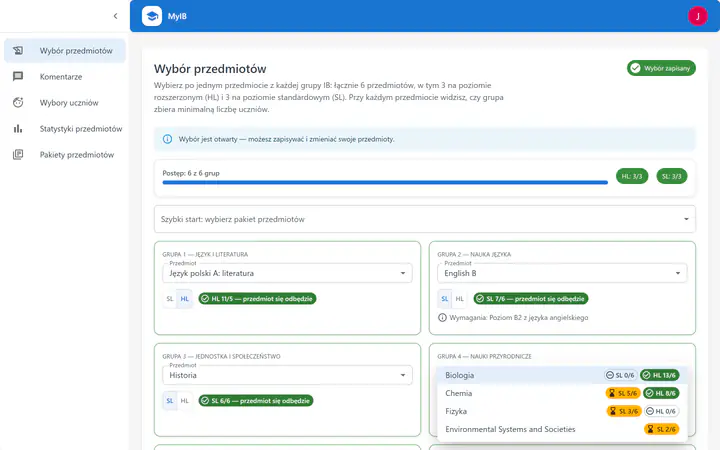
Student
Chooses subjects and sees whether the group will run
- Every subject shows a counter: “HL 11/5 — the subject will run” or “SL 3/6 — 3 more students needed”.
- IB rules are enforced: one subject from each group, 3 × HL and 3 × SL.
- Choices can be changed until the coordinator closes the selection.
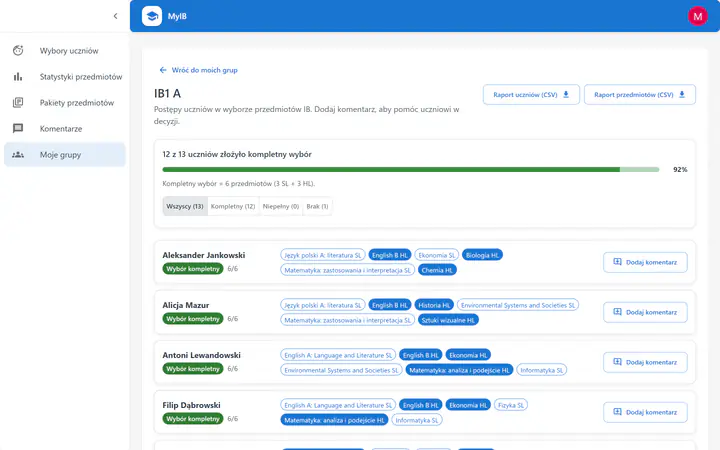
Teacher
Tracks the group’s progress and comments on choices
- A progress bar shows how many students have submitted a complete choice and who has not started.
- Comment on an individual student’s choice — the whole conversation in one place.
- Export student and subject reports for the group to CSV in one click.
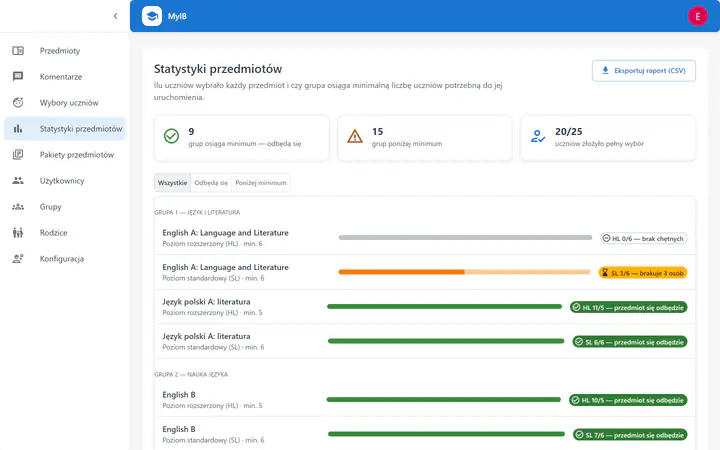
Coordinator
Sees every group and which ones are below minimum
- Summary: how many groups reach the minimum, how many are below it and how many students have finished.
- A “Below minimum” filter shows where to act before the timetable is built.
- Export the report to CSV and open or close the selection for the whole school.


Try it: join a group
Demonstration — sample dataClick “+ join” next to a subject and watch the counter change. It works the same way in the app.
- PhysicsHL · min. 5
HL 4/5 — 1 more student needed
- ChemistrySL · min. 6
SL 5/6 — 1 more student needed
- EconomicsSL · min. 6
SL 3/6 — 3 more students needed
- BiologyHL · min. 5
HL 11/5 — the subject will run
MyIB is used by schools including I Społeczne Liceum Ogólnokształcące im. Maharadży Jam Saheba Digvijay Sinhji in Warsaw (IB World School, Raszyńska St.), where the app runs under the name MyPath.
Application Features
MyIB offers comprehensive tools for managing the subject selection process
Subject Management
Easy addition, editing, and configuration of IB subjects with SL and HL level divisions
Groups and Users
Manage students, teachers, parents, and administrators in one system
Subject Selection
Intuitive interface for students to choose subjects according to IB requirements
Statistics and Reports
Detailed subject selection statistics and data export capabilities
Comment System
Communication between students and teachers regarding subject selection
Data Security
Advanced security measures and data access control
Benefits for Everyone
👨🎓 For Students
- Clear interface for subject selection
- View requirements for each subject
- Ability to communicate with teachers
- Track the status of your selections
👨🏫 For Teachers
- Easy management of student groups
- Review and verify student selections
- Comment system for communication
- Access to subject statistics
👥 For Parents
- View your child's selections
- Ability to communicate with teachers
- Understand the IB selection process
- Support in making decisions
⚙️ For Administrators
- Full control over the system
- Manage users and groups
- Configure subjects and requirements
- Advanced reports and statistics
Frequently asked questions
What is MyIB?
MyIB is a web application for schools that run the International Baccalaureate programme. It collects students’ subject choices (SL and HL), checks them against the programme rules, helps plan subject groups and produces reports.
Is MyIB the IBO “My IB” portal?
No. “My IB” (myib.ibo.org) is the official portal of the International Baccalaureate Organization for students, teachers and coordinators. MyIB (myib.pl) is an independent application for organising subject selection in a school. To sign in to the IBO portal, go to myib.ibo.org.
Who is MyIB for?
For IB schools: students choosing subjects, teachers and coordinators reviewing choices, parents following their child’s decisions and administrators configuring subjects and groups.
How do I log in to MyIB?
Users of schools that use MyIB sign in at app.myib.pl. Accounts are created by the school administrator.
How does MyIB help with subject selection?
It collects students’ preferences, checks every choice against the IB programme requirements in real time, lets teachers comment and shows subject popularity statistics that make group planning easier.
How much does MyIB cost?
We start with a free pilot for one subject-choice cycle. After the pilot, the price depends on the number of students using the application – we prepare an individual quote on request. Pricing and free pilot →
Where is student data stored and do you sign a data processing agreement?
The school is the data controller and MyIB processes the data on its behalf. On request we provide a data processing agreement (Article 28 GDPR). The infrastructure, safeguards, data scope and subprocessors are described on the security page. Security and data protection →
How does implementation work?
The school administrator configures subjects, SL/HL levels, minimum group sizes and choice rules, and imports student, teacher and parent accounts from a CSV file. The file is checked first without saving anything, and new users receive an e-mail with a link to set their password. Book a demo →
What language is the application in?
The MyIB application interface is currently in Polish. The myib.pl website is available in Polish and English.
Guides for DP coordinators
- How to run DP subject choices: a step-by-step process for IB coordinators
- Minimum group sizes for DP subjects: spotting non-viable classes early
- From DP subject choices to option blocks: building the timetable grid
- Spreadsheets and forms vs dedicated IB course selection software
- Validating DP subject combinations: SL/HL counts, subject groups and school rules